Preparing the Word layout for Business Central is the job nobody wants because what should be a ten-minute layout tweak inevitably turns into hours of troubleshooting broken tables and ghost margins. So I thought, why not let AI suffer instead of me…
The task
I have a customer who is using self-billing invoices and I recently prepared an extension for them which can email these invoices the same way as the sales ones. However, I was missing the email body for the self-billing invoice report.
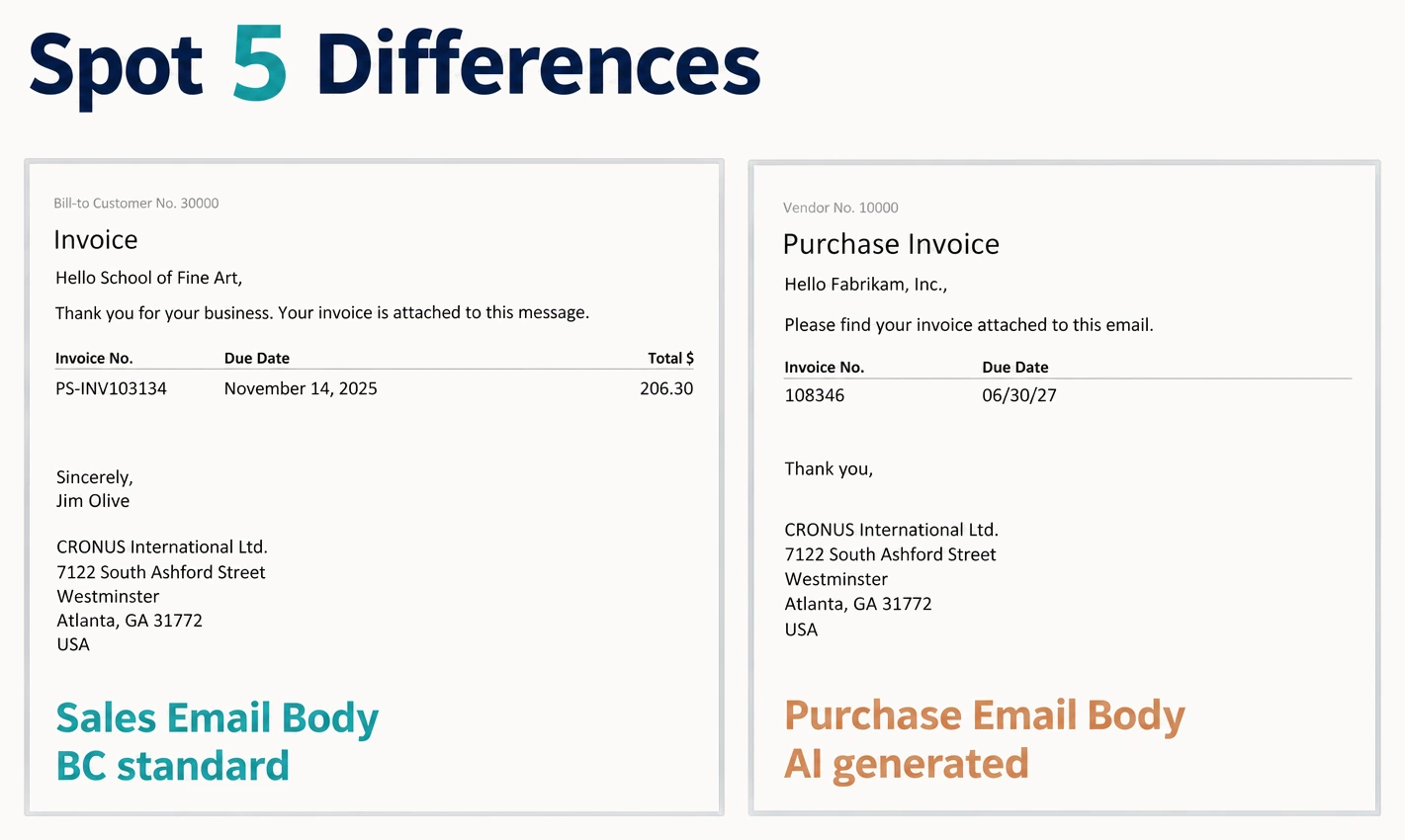
I therefore decided to give my AI agent a try to replicate the sales invoice email body for the purchase invoice report. And this is what I got:
AI tools I used
Hermes (an open-source AI agent that automates tasks and has self-learning built in) + DeepSeek-V4-Flash (just a smaller, lightweight model of the DeepSeek V4 family, but it was freely available as it runs on our local hardware) — but this should work with any other AI agent connected to a capable LLM.
What I had to do
- export a blank Word layout (it was used by the AI agent as the base for the new layout)
- export a standard sales invoice email body layout — as the customer wanted the same look for the self-billing invoices as for the sales ones
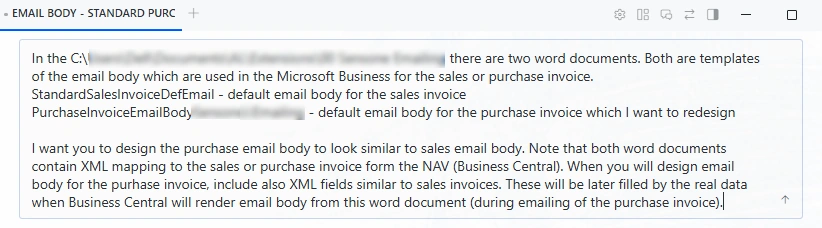
- prepare the initial prompt
What my AI agent did
- prepared Python scripts
- used ready-made Hermes skills for Word
- prepared a custom skill for BC Word layouts
- built a ready-made Word layout
- checked its own work before showing it to me by rendering the layout and comparing it with the expected result (all done internally, with no need to connect to a BC environment for this)
This output was enough for me to see that my AI agent can handle such a layout. I then prepared the final layout the same way, using the real self-billing report from the customer's BC. After testing in the real BC environment and a few adjustments, I was ready to deploy it for the user acceptance testing.
Lessons learned
Instruct your agent to:
- render the report using the sample data — Ask for a render that carries real-looking values — the longest name in the dataset or a description that wraps onto three lines, so that the agent will see how the report will look with real data and can make adjustments before it hands you the report for your final testing
- avoid rebuilding the whole layout every time you want some change, just do partial edits — this will ensure that your agent will not replace any modifications you made manually in the layout
- save a backup copy of the layout after each change — so that you can revert to an older version if something goes wrong
Final thoughts
So the initial statement "Preparing the Word layout for Business Central is the job nobody wants" should correctly be "Preparing the Word layout for Business Central is the job nobody wanted before". Word layouts still lack many things, e.g. multilanguage captions or the possibility to calculate totals that are not present in the dataset. But AI can not only build the layout itself but can also help with modifying the dataset to overcome these limitations.
Other solutions worth watching
I am sure that in the future the preparation of the reports for BC will be much more enjoyable work than before.
Recently Tomas Kapitan published an MCP server (bc-word-layout-mcp) which allows AI agents to build Word layouts directly from VS Code. It needs installation and some technical knowledge (or an AI agent), but is open source.
And Erik Hougaard launched Simple Object Designer +Reports, a new edition of his Simple Object Designer extension. It adds a visual report designer with its own PDF rendering engine, which works as an alternative to RDLC and Word layouts rather than a replacement. A built-in AI agent can design a layout from a description, a PDF or a photo, and the tool can even add missing fields, including calculated ones, without code. It also supports running totals. On the downside, it is paid and creates a bit of vendor lock-in. Still, it is interesting to watch his demo video on YouTube to see how report layout preparation could look in the AI era.
Also Stefan Maron has a similar approach with his Pageworks. It also has its own engine for rendering PDF documents, as an alternative to RDLC and Word layouts. In comparison to Simple Object Designer, this solution is more flexible, as it allows you to edit the layouts in a plain text file and to use your own AI agent.
 contact list